- Home Page /
- Electronics /
- Computer Accessories /
- Computer Accessories & Peripherals /
- Input Devices /
- Digital Pens /
- Replacement Nib Compatible for Microsoft Surf...
0 ratings


Item #:
113938793
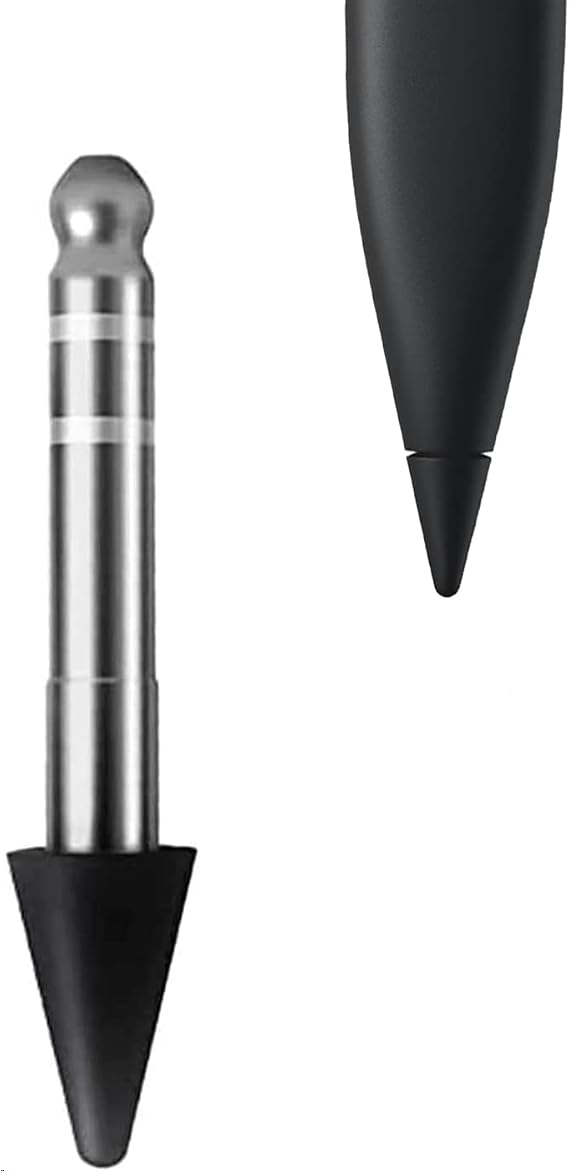
Replacement Nib Compatible for Microsoft Surface Slim Pen 2 Gen, Slim Pen 2 Tip Replacement
Item #:
113938793
XOF 10938
Price Details
Excluding Shipping & Custom charges ( Shipping and custom charges will be calculated on checkout )
*All items will import from US
0 ratings
Write a review
In stock
 Imported from USA store
Order now and get it around Thursday, September 24
Secured transaction
Ubuy works hard to protect your security and privacy. Our advanced payment security system ensures confidentiality by encrypting your information during transmission using AES (Advanced Encryption Standards) and SSL (Secure Socket Layer) protocols. Your payment details are 100% secure as we do not share your payment details with third party sellers.
Our Top Logistics Partners


Restore the soft and smooth writing experience of the Surface Slim Pen 2.

Fast
Shipping

Free
Return*

Secure Packaging

100% Original Products

PCI DSS Compliance

ISO 27001 Certified



Note: Step Down Voltage Transformer required for using electronics products of US store (110-120). Recommended power converters Buy Now.


What Stands Out
Precision Design
Engineered for accuracy, these replacement nibs ensure precise writing and drawing, enhancing your creativity and productivity with the Microsoft Surface Slim Pen 2.
Easy Installation
Quick and hassle-free replacement process allows you to swap out nibs in seconds, minimizing downtime and ensuring a seamless experience while using your Surface Slim Pen.
Durable Material
Manufactured from high-quality materials, these nibs offer longevity and consistent performance, providing excellent value and reliability for daily use.
Product Details
| Brand | Dakexiong |
| Number of Packs | 1 |
| Unit Count | 1 Count |
| Manufacturer | Dakexiong |
| Compatible Devices | Compatible for microsoft surface slim pen 2 |
| Minimum Required Operating System Version | Windows 10 |
| Compatible Tablet Computer Models | Microsoft Surface Pro X |
| Item Weight | 0.06 kg |
| Color | Black |
| Enclosure Material | Plastic |
| Material | Plastic |
Who Should Buy?

-
Artists and Designers
This product is ideal for artists and designers needing precise control and sensitivity for their digital artwork.
-
Note-Takers
Students and professionals who take notes digitally will benefit from improved writing experience and accuracy.
-
Frequent Users
Users who regularly employ their Slim Pen 2 will appreciate the ease of replacement and enhanced pen life.

-
Casual Users
Occasional users may not need a replacement nib as infrequently use reduces wear and tear on the original nib.
Product Description
Replacement Nib Compatible for Microsoft Surface Slim Pen 2 Gen, Slim Pen 2 Tip Replacement
Have any Query? Chat with us
Customer Questions & Answers
-
Question:
What are the features of the Replacement Nib for Microsoft Surface Slim Pen 2?
Answer: The Replacement Nib for Microsoft Surface Slim Pen 2 features precision engineering for an accurate drawing experience. Its design includes various hardness levels, allowing users to choose between a softer tip for sketching and a firmer tip for writing. This versatility makes the nib suitable for artists, students, and professionals alike who require precision and comfort. The nibs are easily interchangeable, ensuring that you maintain your creative flow without interruptions. -
Question:
How do I replace the nib on my Slim Pen 2?
Answer: To replace the nib on your Slim Pen 2, first, gently pull out the existing tip using a pair of tweezers. Next, take your new replacement nib and push it firmly into the pen's tip slot until you hear a click. Proper installation is crucial to ensure optimal performance. This simple process allows users to easily switch tips based on their needs, making it perfect for tasks ranging from fine detail work to broader strokes. -
Question:
Are the replacement nibs suitable for drawing and note-taking?
Answer: Yes, the replacement nibs are designed to accommodate both drawing and note-taking seamlessly. The interchangeable tips allow users to select one that best fits their activity, offering ideal friction and responsiveness for both artistic and textual tasks. For example, softer tips can be excellent for sketching work without damaging the screen, while harder tips might provide better feedback for precise note-taking. This functionality enhances user experience across various tasks. -
Question:
Do the replacement nibs affect the pressure sensitivity of the Slim Pen 2?
Answer: The replacement nibs are designed to maintain the pressure sensitivity features of the Slim Pen 2 intact. Although different nib materials may provide varied feedback, they don’t compromise the pressure sensitivity functionality engineered into the pen. Users appreciating responsive drawing may find that experimenting with different nibs improves their overall performance, especially in creative applications like drawing apps that utilize pressure levels for diverse brush effects. -
Question:
How many replacement nibs come in a package?
Answer: Typically, a package of replacement nibs for the Microsoft Surface Slim Pen 2 includes multiple nibs to give users options for different tasks. This variety may include hard, medium, and soft tips, catering to various personal preferences and applications. Having multiple nibs at hand ensures that you can switch out your pen tips based on the context—be it illustration, note-taking, or professional presentations. -
Question:
Are these replacement nibs compatible with other Microsoft pens?
Answer: No, these replacement nibs are specifically designed for the Microsoft Surface Slim Pen 2 and are not compatible with other models. Each pen has its own specifications and design, so using the correct nib ensures optimal performance. This is important to keep in mind as it helps maximize the pen's capabilities, allowing users to enjoy a seamless experience tailored to the Surface Slim Pen 2's functionality. -
Question:
How do I know when it's time to replace my Slim Pen 2 nib?
Answer: You should consider replacing your Slim Pen 2 nib when you notice reduced responsiveness or issues with precision during use. Signs of wear, such as fraying or a missing tip, are also indicators that a replacement is needed. Regular replacement helps maintain the quality of your writing and drawing, ensuring that you always get the best performance out of your Surface Slim Pen 2 in all your creative or professional endeavors. -
Question:
Can I use these replacement nibs on other devices?
Answer: These replacement nibs are specifically designed for the Microsoft Surface Slim Pen 2, meaning they are not compatible with other devices or pen models. It's essential to ensure that you're using the correct nib for your pen model to maintain optimal functionality. Each device's technology can differ significantly, and using the appropriate nib ensures that you’ll achieve the best performance and user experience. -
Question:
Where can I buy Replacement Nib Compatible For Microsoft Surface Slim Pen 2 in Guinea-Bissau?
Answer: You can buy Replacement Nib Compatible for Microsoft Surface Slim Pen 2 from Ubuy in Guinea-Bissau. Ubuy offers a wide range of replacement nibs suitable for your Surface Slim Pen 2, ensuring you have access to high-quality accessories that enhance your productivity and creativity. Their platform provides an easy and reliable shopping experience, making it simple to find the right products.
Dakexiong Digital Pens Editorial Review
No editorial reviews found
Customer Reviews & Ratings
1 customers ratings
-
5 Star
100%
-
4 Star
0%
-
3 Star
0%
-
2 Star
0%
-
1 Star
0%
Review this product
Share your thoughts with other customers
Pros
- Easy to install
- Improves writing smoothness
- Durable material
- Compatible with Slim Pen 2
- Great for drawing and note-taking
Cons
- May wear out over time
Platform Trust & Buyer Confidence

JK
Jasmin
Verified buyer
“Great products and very good service: very easy and very fast international delivery.”
9 September 2026 · via Trustpilot
AG
Anke
Verified buyer
“Wonderful online shopping experience, smooth transaction from the start. Payment method works conveniently and delivery is unexpectedly fast and reliable. You go the extra mile for service. What makes this even more amazing, you deliver to Namibia. I will remain a happy Ubuy customer and will increase my purchases for sure! Thank you!”
10 September 2026 · via Trustpilot
H
Hazel
Verified buyer
“Very easy to find the products what you need, and so fast delivery, that’s why I highly recommended to others costumers to used ubuy.”
10 September 2026 · via Trustpilot
O
Opaleye
Verified buyer
“I received exactly what I ordered I was skeptical about your site because that was my first time to order. But the order came timely and neatly packaged. I was not disappointed. Thank you.”
11 September 2026 · via Trustpilot
AC
Adele
Verified buyer
“Easy to find and order what you want on the website. Delivery is quick to the UK”
8 September 2026 · via Trustpilot
Secure Checkout
Global Delivery
Easy Returns
Genuine Products
Product Price History
Important information
- Limitations : For products shipped internationally, please note that any manufacturer warranty may not be valid; manufacturer service options may not be available; product manuals, instructions, and safety warnings may not be in destination country languages; the products (and accompanying materials) may not be designed in accordance with destination country standards, specifications, and labeling requirements; and the products may not conform to destination country voltage and other electrical standards (requiring use of an adapter or converter if appropriate). The recipient is responsible for assuring that the product can be lawfully imported to the destination country. When ordering from Ubuy or its affiliates, the recipient is the importer of record and must comply with all laws and regulations of the destination country.
- Not all the products listed on Ubuy are for sale, as Ubuy is a global search engine. Products are subject to export/trade regulations.
XOF 10938
Order now and get it around Thursday, September 24
This item is not restrict in my country.(Please click on above link if this item is not restrict in your country, So our team will review and allow.)
QTY:
Secured transaction
PCI DSS compliant and ISO 27001:2022 certified, with encrypted payments and full buyer protection on every order.
Our Top Logistics Partners
Fastest cross-border delivery
Features & Benefits
- Compatible with Microsoft Surface Slim Pen 2.
- 4,096 pressure points for high accuracy.
- Lightweight design for enhanced control.
- Easy installation for quick replacement.
- Glides seamlessly for a smooth writing experience.
- Note: Only one replacement nib included.
Ubuy Assurance
Experience worry-free shopping with 100% original products, PCI DSS-compliant payment security, ISO 27001-certified data protection, the fastest cross-border delivery, free returns *, and secure packaging on every order.