0 ratings

Artigo n.º:
109535
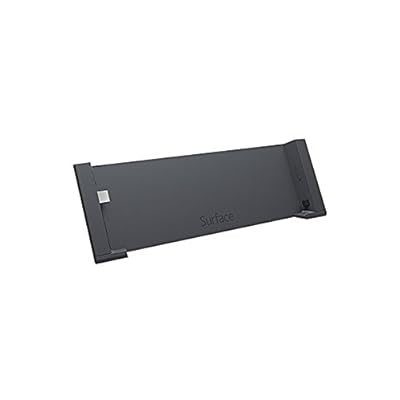
Microsoft Docking Station for Surface Pro and Surface Pro 2 G5Y-00001
Artigo n.º:
109535
XOF 70273
Price Details
Excluding Shipping & Custom charges ( Shipping and custom charges will be calculated on checkout )
*All items will import from EUA
0 ratings
Escreva um comentário
Em estoque
 Importado da loja USA
QTY:
Encomende já e receba por volta de Sábado, Julho 04
Secured transaction
Ubuy works hard to protect your security and privacy. Our advanced payment security system ensures confidentiality by encrypting your information during transmission using AES (Advanced Encryption Standards) and SSL (Secure Socket Layer) protocols. Your payment details are 100% secure as we do not share your payment details with third party sellers.
Os nossos principais Parceiros Logísticos


Transform your Surface Pro into a powerful workstation with our versatile docking station.

Fast
Shipping

Devolução
gratuita*

Embalagem Segura

Produtos 100% Originais

Certificação PCI DSS

Certificação ISO 27001


Note: Step Down Voltage Transformer required for using electronics products of EUA store (110-120). Recommended power converters Compre Agora.


O que se Destaca
Multiple Ports
Equipped with various ports including USB 3.0, HDMI, and Ethernet, this docking station enhances connectivity, allowing seamless integration of peripherals for enhanced productivity.
Designed for Surface
Tailored specifically for Surface Pro and Pro 2, ensuring optimal performance and a perfect fit, without compromising the device's aesthetics or functionality.
Easy Setup
Featuring a plug-and-play design, this docking station allows for quick and hassle-free connection, saving time for users while providing immediate access to essential features.
Detalhes do produto
| Item Weight | 1.3 lbs (590 grams) |
Quem Deverá Comprar?

-
Mobile Professionals
Ideal for professionals on the go who need to quickly connect to multiple devices in various locations.
-
Home Office Users
Perfect for individuals working from home who require a convenient hub for peripherals and larger display connections.
-
Creative Users
Great for artists and designers who need to connect multiple devices for enhanced productivity and creativity.

-
Budget-Conscious Users
Not suitable for users seeking cost-effective options, as it may be priced higher than basic docking solutions.
-
Occasional Users
Inappropriate for users who only occasionally connect devices, as a simpler solution suffices for infrequent use.
-
Gaming Enthusiasts
Not designed for gaming setups that require high-performance specifications or multiple high-speed connections.
DESCRIÇÃO DO PRODUTO
Microsoft Docking Station for Surface Pro and Surface Pro 2 G5Y-00001
About This Item
Upgrade your Microsoft Surface Pro experience with the Microsoft Docking Station for Surface Pro and Surface Pro 2 G5Y-00001. This versatile docking station provides a seamless way to connect your Surface Pro device to a desktop, giving you a desktop-like experience with enhanced productivity and convenience. Designed specifically for the Surface Pro and Surface Pro 2, this docking station offers a range of connectivity options. It features a USB 3.0 port, a Gigabit Ethernet port, a Mini DisplayPort, an audio output, and a Power Input for power supply.
With these ports, you can easily connect your peripherals, such as a mouse, keyboard, monitor, and speakers, to create a personalized workstation setup. The Microsoft Docking Station for Surface Pro and Surface Pro 2 G5Y-00001 is built with high-quality materials to ensure durability and reliability. Its sleek and compact design seamlessly integrates with your Surface Pro, making it a stylish addition to your workspace. Plus, the docking station is easy to set up and use, allowing you to quickly switch between mobile and desktop modes without any hassle. With this docking station, you can transform your Surface Pro into a full-fledged desktop computer with ease.
Whether you're working on a project, streaming videos, or browsing the web, this docking station enhances your productivity and improves your overall computing experience. Upgrade your Surface Pro setup with the Microsoft Docking Station for Surface Pro and Surface Pro 2 G5Y-00001, and enjoy the benefits of a desktop-like experience while preserving the portability and versatility of your Surface Pro device. Shop now and take your Surface Pro to the next level.
Tem alguma Dúvida? Converse connosco
Perguntas e Respostas dos Clientes
-
pergunta:
What devices are compatible with the Microsoft Docking Station for Surface Pro and Surface Pro 2?
Resposta: The Microsoft Docking Station for Surface Pro and Surface Pro 2 is specifically designed to work with the Surface Pro and Surface Pro 2 models. This ensures seamless integration and optimal performance, allowing you to connect multiple peripherals like monitors, keyboards, and mice. If you own a Surface Book or Surface Go, the docking station will not be compatible as each device has distinct ports and features. Users appreciate the docking station for its ability to transform their Surface device into a functional desktop replacement, particularly in office environments. -
pergunta:
How do I connect my Surface Pro to the docking station?
Resposta: Connecting your Surface Pro to the docking station is straightforward. Simply align the device with the docking station and press down until it is firmly in place. The docking station utilizes the Surface Connect port for a secure connection. This allows you to connect external displays via HDMI or Mini DisplayPort and other USB accessories seamlessly. Setting up your workspace for enhanced productivity becomes effortless, especially for remote work scenarios or professional environments, providing you access to your required tools with a single connection. -
pergunta:
What ports are available on the Microsoft Docking Station?
Resposta: The Microsoft Docking Station for Surface Pro and Surface Pro 2 features a variety of ports to enhance connectivity. It includes a Mini DisplayPort for video output, an HDMI port, multiple USB 3.0 ports, an Ethernet port for wired internet access, and a dedicated Surface Connect port. This range of ports allows users to connect to external monitors, printers, and wired networks, making it an excellent solution for multitasking and increased efficiency in work settings, especially where high-speed internet and external display connections are crucial. -
pergunta:
Can I use the docking station while my Surface Pro is charging?
Resposta: Yes, you can utilize the Microsoft Docking Station while your Surface Pro is charging. The docking station is designed to provide power to your Surface device through the Surface Connect port while allowing for the connection of peripherals. This dual functionality ensures that your device remains charged during intensive work sessions, which is particularly beneficial for professionals who rely on their devices throughout the day. This makes multitasking more efficient by eliminating the need to constantly check battery levels. -
pergunta:
Is the docking station portable?
Resposta: The Microsoft Docking Station is relatively compact, designed for desktop use but can be moved if needed. Its lightweight design makes it easier to transport between locations, such as home and office. Users often find this convenient when they have a hybrid work model, needing quick access to their peripherals without complicated setups. However, for frequent travelers, we recommend the less bulky Surface adapters for mobile use, maintaining flexibility without added weight. -
pergunta:
Can the docking station support dual monitors?
Resposta: Yes, the Microsoft Docking Station supports dual-monitor setups. By utilizing the Mini DisplayPort and HDMI outputs, you can connect two separate displays, enhancing your productivity with expanded screen real estate. This feature is particularly useful for tasks requiring multiple windows or applications open simultaneously, such as programming, video editing, or data analysis. Users often report a significant boost in efficiency when working with dual monitors, making it a favored setup for many professionals. -
pergunta:
What is the maximum resolution supported by the docking station?
Resposta: The Microsoft Docking Station can support high-definition resolutions up to 4K via the Mini DisplayPort connection and Full HD via HDMI. This capability ensures that external displays render clear, crisp visuals, making it ideal for graphic design, video playback, and detailed presentations. Users often find that this resolution support elevates their viewing experience, especially when engaged in creative tasks or remote presentations where quality matters. -
pergunta:
Does the docking station have built-in audio capabilities?
Resposta: Yes, the Microsoft Docking Station has built-in audio capabilities when connected to external monitors that support audio output. By using the HDMI port, audio will transmit through compatible monitors, allowing for a complete multimedia experience. This setup is excellent for conference calls or video presentations, ensuring that sound quality complements visual content. Additionally, users can connect external speakers for enhanced audio, making it suitable for a variety of multimedia tasks. -
pergunta:
What is the primary advantage of using a docking station?
Resposta: The primary advantage of using the Microsoft Docking Station is the convenience it offers in connecting multiple devices with a single connection. It enhances productivity by allowing users to transition quickly from a portable device to a full desktop experience. This is particularly beneficial for remote workers or those in need of a comprehensive workspace setup, as it minimizes cable clutter and simplifies the process of engaging with external peripherals. -
pergunta:
Where can I buy the Microsoft Docking Station for Surface Pro and Surface Pro 2 in Guinea-Bissau?
Resposta: You can purchase the Microsoft Docking Station for Surface Pro and Surface Pro 2 (G5Y-00001) through Ubuy in Guinea-Bissau. Ubuy offers a variety of electronic products, including accessories for your Surface devices, ensuring you find the right technology to enhance your productivity and workspace setup with ease.
Microsoft Docking Stations Editorial Review
The Microsoft Surface Pro docking station is a well-made product that perfectly fits Surface Pro II. The dock has one USB 3.0 port on the back, and a charger that can use both 110v and 230v, delivering 12v dc. A mini-display port adapter connects the external monitor and touch screen computer. An AC adapter with no additional cables comes with the product. While it has received great reviews praising its quality and functionality, some users have encountered technical difficulties. Some mistakenly received a Surface Pro 3 docking station instead of the one for Pro 1/2. Others found it shut down their Surface Pro while in use.
Avaliações e Classificações dos Clientes
1 classificações de clientes
-
5 Estrela
0%
-
4 Estrela
100%
-
3 Estrela
0%
-
2 Estrela
0%
-
1 Estrela
0%
Avaliar este produto
Partilhe as suas ideias com outros clientes
Prós
- Well-made and fits Surface Pro II perfectly
- One USB 3.0 port
- Able to use both 110v and 230v
- Mini-display port adapter connects the external monitor and touch screen computer
- Comes with its own AC adapter
- High quality functional product
Contras
- Some users encountered technical difficulties with the product
Histórico de preços do produto
Informação importante
- Limitações: para produtos expedidos internacionalmente, tenha em atenção que qualquer garantia do fabricante pode não ser válida; opções de serviço do fabricante podem não estar disponíveis; manuais de produtos, instruções e avisos de segurança podem não estar nas línguas do país de destino; os produtos (e materiais que o acompanham) pode não ter sido concebido em conformidade com as normas, especificações e requisitos de rotulagem do país de destino; e os produtos podem não estar em conformidade com a voltagem e outras normas elétricas do país de destino (requerendo assim o uso de um adaptador ou conversor caso seja apropriado). O destinatário é responsável por garantir que o produto pode ser legalmente importado para o país de destino. Quando encomenda à Ubuy ou aos seus afiliados, o destinatário é o importador de registo e deve estar em conformidade com todas as leis e regulamentos do país de destino.
- Nem todos os produtos listados na Ubuy estão à venda, uma vez que a Ubuy é um motor de busca global. Os produtos estão sujeitos a leis de exportação/comércio.
XOF 70273
Encomende já e receba por volta de Sábado, Julho 04
Este artigo não está restrito no meu país. (Clique no link acima se este artigo não estiver restrito no seu país, para que a nossa equipa o analise e permita.)
QTY:
Secured transaction
Ubuy works hard to protect your security and privacy. Our advanced payment security system ensures confidentiality by encrypting your information during transmission using AES (Advanced Encryption Standards) and SSL (Secure Socket Layer) protocols. Your payment details are 100% secure as we do not share your payment details with third party sellers.
Os nossos principais Parceiros Logísticos
Entrega internacional mais rápida
Recursos e benefícios
- Compatible with Surface Pro and Surface Pro 2.
- Offers 1 x USB 3.0 port and 3 x USB 2.0 ports for extensive connectivity.
- Includes 1 x RJ-45 Ethernet port for a reliable internet connection.
- Features 1 x Mini DisplayPort for additional display capabilities.
- Comes with 3.5 mm headphone and mic inputs for audio needs.
- Power adapter included for immediate setup.