0 ratings




Artigo n.º:
182358732
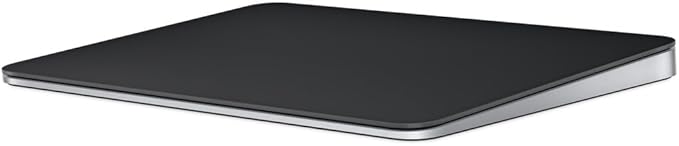
Apple Magic Trackpad - Black Multi-Touch Surface
87% of respondents would recommend this to a friend
Artigo n.º:
182358732
XOF 112066
Detalhes do Preço
Excluindo custos de envio e alfandegários ( Os custos de envio e alfandegários serão calculados na finalização da compra )
*Todos os artigos serão importados de EUA
12%
Em stock
 Importado da loja USA
Qtd.:
Restam apenas 3 artigos em stock.
Encomende já e receba por volta de Terça-feira, Setembro 29
Transação segura
A Ubuy trabalha arduamente para proteger a sua segurança e privacidade. O nosso sistema avançado de segurança de pagamentos garante a confidencialidade ao encriptar as suas informações durante a transmissão, utilizando os protocolos AES (Normas de Encriptação Avançada) e SSL (Camada de Sockets Seguros). Os seus dados de pagamento estão 100% seguros, pois não partilhamos os seus dados de pagamento com vendedores terceiros.
Os nossos principais Parceiros Logísticos


The incredibly long-lasting internal battery will power your Magic Trackpad for about a month or more between charges.

Fast
Shipping

Devolução
gratuita*

Embalagem Segura

Produtos 100% Originais

Certificação PCI DSS

Certificação ISO 27001



Note: Step Down Voltage Transformer required for using electronics products of EUA store (110-120). Recommended power converters COMPRAR AGORA.


O que se Destaca
Wireless Convenience
The Apple Magic Trackpad offers seamless wireless connectivity via Bluetooth, allowing users to enjoy a clutter-free workspace without the hassle of cables.
Multi-Touch Support
Experience intuitive gestures and Multi-Touch capabilities, enabling efficient navigation and enhanced productivity on your Mac or iPad with simple swipes and taps.
Rechargeable Battery
Equipped with a rechargeable battery, the Trackpad provides extended usage on a single charge, eliminating the need for disposable batteries and promoting sustainability.
Detalhes do produto
| Product Dimensions (L x W x H) | 6.89 x 5.1 x 0.98 inches (17.5 x 13 x 2.5 cm) |
| Item Weight | 11.5 ounces (326.03 grams) |
| Manufacturer | Apple |
| Item model number | MXKA3AM/A |
| Batteries | 1 Lithium Ion batteries required. (included) |
| Date First Available | October 28, 2024 |
| Brand | Apple |
| Compatible Devices | Mac mini (M1, 2020), Mac mini (2018), Mac Pro (2023), Mac Pro (2019), Studio Display (2026), Studio Display XDR, Apple Vision Pro (M5), Apple Vision Pro (M2), MacBook Air (Retina, 13_inch, 2020), MacBook Pro (14-inch, M5 Pro or M5 Max), MacBook Pro (16-inch, M5 Pro or M5 Max), MacBook Pro (14-inch, M5), MacBook Pro (14_inch, 2024), MacBook Pro (16_inch, 2024), MacBook Pro (14_inch, 2023), MacBook Neo, MacBook Air (13-inch, M5), MacBook Air (15-inch, M5), MacBook Air (13_inch, M4), MacBook Air (15_inch, M4), MacBook Air (13-inch, M3), MacBook Air (15-inch, M3), MacBook Air (15-inch, M2), MacBook Air (13-inch, M2), MacBook Air (M1), MacBook Pro (16_inch, 2023), MacBook Pro (13_inch, M2, 2022), MacBook Pro (14_inch, 2021), MacBook Pro (16-inch, 2021), MacBook Pro (16-inch, 2019), MacBook Pro (13-inch, M1, 2020), MacBook Pro (13-inch, 2020), iMac (24_inch, M4, 2024), iMac (24-inch, M3, 2023), iMac (24-inch, M1, 2021), iMac (Retina 4K, 21.5_inch, 2019), iMac (Retina 5K, 27-inch, 2019–2020), iMac Pro (2017), Mac Studio (2025), Mac Studio (2023), Mac Studio (2022), Mac mini (2024), Mac mini (2023), iPad (A16), iPad (10th generation), iPad (9th generation), iPad (8th generation), iPad (7th generation), iPad (6th generation), iPad (5th generation), iPad mini (A17 Pro), iPad mini (6th generation), iPad mini (5th generation), iPad mini 4, iPad Pro 12.9-inch (1st generation), iPad Pro 11-inch (M5), iPad Pro 11-inch (M4), iPad Pro 11-inch (4th generation), iPad Pro 11-inch (3rd generation), iPad Pro 11-inch (2nd generation), iPad Pro 11-inch (1st generation), iPad Pro 10.5-inch, iPad Pro 13-inch (M5), iPad Pro 13-inch (M4), iPad Pro 12.9-inch (6th generation), iPad Pro 12.9-inch (5th generation), iPad Pro 12.9-inch (4th generation), iPad Pro 12.9-inch (3rd generation), iPad Pro 12.9-inch (2nd generation), iPad Pro 9.7-inch, iPad Air 13-inch (M4), iPad Air 11-inch (M4), iPad Air 13-inch (M3), iPad Air 11-inch (M3), iPad Air 13-inch (M2), iPad Air 11-inch (M2), iPad Air (5th generation), iPad Air (4th generation), iPad Air (3rd generation), iPad Air 2 See more |
| Connectivity Technology | Bluetooth |
| Color | Black |
| Special Feature | Lightweight, Portable, Rechargeable, Touchpad, Wireless |
O que está incluído na caixa
Item
Quem Deverá Comprar?

-
Graphic Designers
The precision and multi-touch capabilities enhance their workflow and make intricate designs easier to create.
-
Frequent Mac Users
Ideal for users deeply integrated into the Apple ecosystem, enhancing productivity and comfort during extended use.
-
Minimalist Setups
Perfect for users who prefer a clean and clutter-free workspace without sacrificing functionality.

-
Gaming Enthusiasts
Not ideal for gamers needing quick responses and tactile feedback typically offered by traditional gaming mice.
DESCRIÇÃO DO PRODUTO
Tem alguma Dúvida? Converse connosco
Perguntas e respostas do cliente
-
Pergunta:
What are the key features of the Apple Magic Trackpad - Black Multi-Touch Surface?
Resposta: The Apple Magic Trackpad is celebrated for its sleek design and innovative technology. It incorporates a large, smooth glass surface that allows for natural multi-touch gestures like swiping, pinching, and scrolling. With advanced Force Touch technology, it detects different pressure levels, enhancing user interaction. This trackpad also seamlessly connects to Mac devices via Bluetooth, making it ideal for users seeking a tidier workspace without clutter. Additionally, its spacious surface promotes precision, perfect for graphic design, video editing, or general navigation. -
Pergunta:
Is the Apple Magic Trackpad compatible with all Mac devices?
Resposta: Yes, the Apple Magic Trackpad is designed to be compatible with a wide range of Mac devices, including MacBook, Mac mini, and iMac models. It connects wirelessly via Bluetooth, ensuring a stable and responsive connection. Some features, such as specific gestures, may require the latest macOS for full functionality. This makes it an excellent enhancement for both older and newer Mac users who are looking to improve their productivity and overall user experience. -
Pergunta:
How do I recharge the Apple Magic Trackpad?
Resposta: The Apple Magic Trackpad features a built-in rechargeable battery, making it eco-friendly and convenient. To recharge, simply connect it to your Mac with the included USB cable, and it will charge while you use it. A full charge can last for weeks, depending on usage, so you won't have to frequently stop to recharge. This is particularly beneficial for users who require extended periods of use without interruptions, such as designers or programmers. -
Pergunta:
Can I customize the gestures on the Apple Magic Trackpad?
Resposta: Yes, the Apple Magic Trackpad allows users to customize gestures through the System Preferences on macOS. You can modify existing gestures and even create new ones that suit your workflow. This flexibility enables users to tailor their interaction to fit specific applications or personal preferences, enhancing efficiency. For example, a graphic designer could set up gestures to streamline tasks in design software, making the process smoother and more intuitive. -
Pergunta:
What is the difference between the Apple Magic Trackpad and the Magic Mouse?
Resposta: The primary difference lies in their form factors and functionalities. The Apple Magic Trackpad provides a larger surface area for multi-touch gestures, while the Magic Mouse features a compact design suitable for portability. The trackpad's expansive surface encourages more precise control and allows for advanced gestures, making it ideal for creative tasks. Conversely, those who prefer a more traditional mouse experience may find the Magic Mouse more comfortable. Your choice will depend on your specific needs and preferences, especially regarding the tasks you perform most frequently. -
Pergunta:
Is the Apple Magic Trackpad in black available in different countries?
Resposta: Yes, the Apple Magic Trackpad - Black Multi-Touch Surface is available in various countries through authorized retailers and online platforms. Availability might differ based on local demand and stock. Checking with local vendors can provide insights into the best purchasing options within your region. It's a great idea for users looking to enhance their workstation with this sleek accessory. -
Pergunta:
What materials are used in the Apple Magic Trackpad's construction?
Resposta: The Apple Magic Trackpad is constructed from high-quality materials including durable glass and aluminum. The glass surface contributes to its smooth, responsive touch-feel, while the aluminum casing provides a sturdy yet elegant design. This combination not only enhances aesthetic appeal but also ensures longevity and resilience, making it suitable for both casual and professional use. Users often appreciate the premium feel while enjoying a device that complements their Mac setup seamlessly. -
Pergunta:
How do I connect the Apple Magic Trackpad to my device?
Resposta: To connect the Apple Magic Trackpad, ensure it is powered on, then navigate to the Bluetooth settings on your Mac. Once in Bluetooth preferences, you will see the trackpad listed under available devices. Click to connect, and it will pair without any hassle. This straightforward process allows for a seamless setup, enabling you to start using it instantly. It’s particularly convenient for users who frequently change devices or work in multiple locations. -
Pergunta:
Where can I buy Apple Magic Trackpad - Black Multi-Touch Surface in Guinea-Bissau?
Resposta: You can purchase the Apple Magic Trackpad - Black Multi-Touch Surface in Guinea-Bissau from Ubuy. They offer a variety of tech products, ensuring a reliable shopping experience. Ubuy provides a user-friendly platform for browsing and comparing features, making it simple to find the right options for your needs. Whether you're enhancing your workspace at home or outfitting an office, Ubuy is a great destination for this excellent accessory. -
Pergunta:
Does the Apple Magic Trackpad support gestures for different applications?
Resposta: Absolutely! The Apple Magic Trackpad supports a wide variety of gestures that can be utilized across different applications. For instance, in photo editing software, you can zoom in and rotate images with simple gestures, allowing for more creative control. Similarly, web browsing can be enhanced with swiping gestures to go back and forth between pages. This intuitive multi-touch capability is a standout feature, enabling users to navigate tasks efficiently and creatively across various platforms.
Apple MXKA3AM/A Editorial Review


Apple Magic Trackpad: Wireless, Bluetooth, Rechargeable. Works with Mac or iPad; Multi-Touch Surface - White. The Apple Magic Trackpad is a sleek, wireless input device that revolutionizes interaction with Macs and iPads through its large, responsive glass surface and multi-touch capabilities. With exceptional gesture support, it enhances productivity by allowing for customizable commands tailored to individual workflows. Users appreciate the trackpad's ergonomic design, which alleviates wrist stress compared to traditional mice. Battery performance impresses, with automatic sleep modes and the ability to charge while in use. Overall, the Magic Trackpad combines aesthetic appeal with robust functionality, making it an excellent choice for both casual and professional users.
Avaliações e Classificações dos Clientes
977 classificações de clientes
-
5 Estrela
85%
-
4 Estrela
8%
-
3 Estrela
3%
-
2 Estrela
0%
-
1 Estrela
4%
Avaliar este produto
Partilhe as suas ideias com outros clientes
Prós
- Sleek and modern design enhances workspace aesthetics
- Customizable gestures improve user experience
- Ergonomic design reduces wrist and hand strain
- Seamless Bluetooth connectivity eliminates tangled wires
- Exceptional battery life for prolonged use
Contras
- Might have a minor learning curve for new users
CONFIANÇA NA PLATAFORMA E SEGURANÇA DO COMPRADOR

JK
Jasmin
Comprador verificado
“Great products and very good service: very easy and very fast international delivery.”
9 September 2026 · via Trustpilot
AG
Anke
Comprador verificado
“Wonderful online shopping experience, smooth transaction from the start. Payment method works conveniently and delivery is unexpectedly fast and reliable. You go the extra mile for service. What makes this even more amazing, you deliver to Namibia. I will remain a happy Ubuy customer and will increase my purchases for sure! Thank you!”
10 September 2026 · via Trustpilot
H
Hazel
Comprador verificado
“Very easy to find the products what you need, and so fast delivery, that’s why I highly recommended to others costumers to used ubuy.”
10 September 2026 · via Trustpilot
O
Opaleye
Comprador verificado
“I received exactly what I ordered I was skeptical about your site because that was my first time to order. But the order came timely and neatly packaged. I was not disappointed. Thank you.”
11 September 2026 · via Trustpilot
AC
Adele
Comprador verificado
“Easy to find and order what you want on the website. Delivery is quick to the UK”
8 September 2026 · via Trustpilot
Checkout Seguro
Entrega Global
Devoluções Fáceis
Produtos Genuínos
Histórico de preços do produto
Informação importante
- Limitações: para produtos expedidos internacionalmente, tenha em atenção que qualquer garantia do fabricante pode não ser válida; opções de serviço do fabricante podem não estar disponíveis; manuais de produtos, instruções e avisos de segurança podem não estar nas línguas do país de destino; os produtos (e materiais que o acompanham) pode não ter sido concebido em conformidade com as normas, especificações e requisitos de rotulagem do país de destino; e os produtos podem não estar em conformidade com a voltagem e outras normas elétricas do país de destino (requerendo assim o uso de um adaptador ou conversor caso seja apropriado). O destinatário é responsável por garantir que o produto pode ser legalmente importado para o país de destino. Quando encomenda à Ubuy ou aos seus afiliados, o destinatário é o importador de registo e deve estar em conformidade com todas as leis e regulamentos do país de destino.
- Nem todos os produtos listados na Ubuy estão à venda, uma vez que a Ubuy é um motor de busca global. Os produtos estão sujeitos a leis de exportação/comércio.
XOF 112066
Encomende já e receba por volta de Terça-feira, Setembro 29
Este artigo não está restrito no meu país. (Clique no link acima se este artigo não estiver restrito no seu país, para que a nossa equipa o analise e permita.)
Qtd.:
Restam apenas 3 artigos em stock.
Transação segura
Em conformidade com a norma PCI DSS e com certificação ISO 27001:2022, com pagamentos encriptados e proteção total do comprador em todas as encomendas.
Os nossos principais Parceiros Logísticos
Entrega internacional mais rápida
Recursos e benefícios
- Wireless and Bluetooth connectivity provides hassle-free usage.
- Rechargeable battery eliminates the need for loose batteries.
- Multi-Touch surface enhances tracking experience with pressure sensitivity.
- Compatible with Mac or iPad, ready to use straight out of the box.
- Large edge-to-edge glass surface allows for efficient scrolling and swiping.
- Up to a month of battery life between charges for enhanced productivity.
Ubuy Assurance
Experience worry-free shopping with 100% original products, PCI DSS-compliant payment security, ISO 27001-certified data protection, the fastest cross-border delivery, free returns *, and secure packaging on every order.